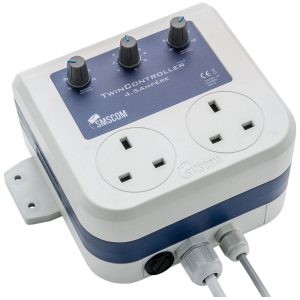
DimLux 15-Amp Fan Aux Box (3 Socket)
£428.00
Optimize your grow with DimLux 15-Amp Fan Aux Box (3 Socket). In stock at Hydroponic Centre, enjoy 24-48 hours delivery.
In stock
Description
Introducing the DimLux 15-Amp Fan Aux Box with 3 Sockets, a versatile and essential accessory for optimizing your grow room environment. Explore its key features:
Key Features:
- Multi-Socket Functionality:
- Three built-in sockets to accommodate multiple devices, such as fans or other auxiliary equipment.
- 15-Amp Capacity:
- Robust 15-Amp capacity ensures reliable power distribution for connected devices.
- Enhanced Climate Control:
- Enables precise control over environmental conditions by connecting and controlling additional fans or accessories.
- Easy Installation:
- Simple and straightforward installation, making it accessible for growers of all experience levels.
- Compatible with DimLux Maxi Controller:
- Seamlessly integrates with the DimLux Maxi Controller for centralized environmental management and automation.
- Durable Construction:
- Sturdy build and high-quality materials ensure durability and longevity, even in demanding grow room environments.
- Customizable Fan Control:
- Adjust fan speeds and settings to optimize airflow and maintain an ideal climate for plant growth.
- Expandable Configuration:
- Expand your grow room setup by connecting multiple DimLux Fan Aux Boxes for enhanced climate control capabilities.
- Maximize CO2 Distribution:
- Facilitates efficient distribution of CO2 or other supplements, promoting optimal photosynthesis and plant health.
- Seamless Integration:
- Seamlessly integrates into existing DimLux systems, enhancing the overall efficiency of your cultivation environment.
- Remote Monitoring (with DimLux Maxi Controller):
- Monitor and control connected devices remotely through the DimLux Maxi Controller, providing real-time insights.
- Proven Performance:
- Backed by positive reviews and industry acclaim, the DimLux 15-Amp Fan Aux Box is trusted for its reliability and performance.
Elevate your grow room’s climate control with the DimLux 15-Amp Fan Aux Box.
Contains
1 box of DimLux 15-Amp Fan Aux Box (3 Socket)
How to use
1. Unboxing and Inspection:
- Carefully unbox the DimLux 15-Amp Fan Aux Box and inspect all components.
- Ensure the aux box, power cord, and any included accessories are present and in good condition.
2. Placement and Mounting:
- Choose an optimal location within your grow room to mount the Fan Aux Box.
- Ensure proper ventilation and accessibility for connecting devices.
3. Connection to DimLux Maxi Controller (Optional):
- If using the DimLux Maxi Controller, connect the Fan Aux Box to the designated port.
- Follow the Maxi Controller manual for proper configuration and integration.
4. Device Connection:
- Plug in the devices you want to control, such as fans or other auxiliary equipment, into the available sockets on the aux box.
5. Power Connection:
- Connect the DimLux 15-Amp Fan Aux Box to a power source using the provided power cord.
- Ensure a stable power supply for consistent operation.
6. DimLux Maxi Controller Settings (Optional):
- If connected to the DimLux Maxi Controller, navigate the controller interface to customize fan speeds, schedules, and settings.
- Program the controller for automated climate control based on your specific cultivation requirements.
7. Fan Control and Adjustment:
- Adjust fan speeds and settings directly on the Fan Aux Box to optimize airflow within the grow room.
- Customize settings based on the growth stage of your plants and environmental conditions.
8. Expandability (Optional):
- Consider expanding your grow room setup by connecting additional DimLux Fan Aux Boxes for increased control and versatility.
9. Remote Monitoring (with DimLux Maxi Controller):
- If integrated with the DimLux Maxi Controller, monitor and control connected devices remotely.
- Make real-time adjustments to maintain an ideal climate for plant growth.
10. Troubleshooting Tips:
- Refer to the user manual for troubleshooting tips if you encounter any issues.
- Contact customer support for assistance if problems persist.


Reviews
There are no reviews yet