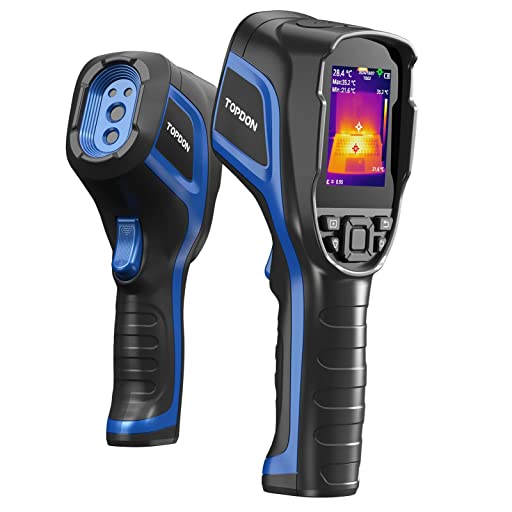
TOPDON TC004 Handheld Thermal Imaging Camera
£550.00
Shop TOPDON TC004 Thermal Imaging Camera. Ideal for grow area diagnostics. Order now for fast delivery! In stock at Hydroponic Centre. 24-48 hours delivery.
In stock
Description
The TOPDON TC004 Handheld Thermal Imaging Camera is a highly practical and versatile tool designed for a wide range of applications, including grow area diagnostics, home maintenance, electrical inspections, and more. Unlike many thermal cameras that require syncing with a smartphone, the TC004 is a standalone handheld unit, making it incredibly easy to use without the need for additional devices. With its advanced features and user-friendly design, the TC004 is an ideal choice for both professionals and DIY enthusiasts looking to identify temperature variations accurately and efficiently.
Features:
- Temperature Range: -20°C to 350°C (-4°F to +662°F)
- Display: 2.8-inch screen with 256×192 pixels resolution
- Battery Life: Up to 12 hours of continuous use on a full charge
- Design: Ergonomically designed with a rugged build for comfortable handling and durability
- Cost/Hour to Use: The device uses minimal power, so the cost per hour is negligible, primarily related to recharging the battery.
Contains
- TOPDON TC004 Handheld Thermal Imaging Camera
- USB Charging Cable
- User Manual
- Protective Carrying Case
- Wrist Strap
How to use
Using the TOPDON TC004 Handheld Thermal Imaging Camera is straightforward and intuitive:
- Power On: Press the power button to turn on the device.
- Adjust Settings: Use the menu buttons to adjust settings such as temperature units (°C/°F) and display preferences.
- Scan Area: Point the camera at the area or object you want to inspect. The 2.8-inch display with 256×192 pixels resolution will show the thermal image in real-time.
- Analyze Temperature: The TC004 can measure temperatures ranging from -20°C to 350°C (-4°F to +662°F). Use this wide range to detect temperature anomalies in various scenarios.
- Save and Review: Capture images and review them directly on the camera’s display or transfer them to a computer for detailed analysis.
Best Usage Tips:
- Regularly calibrate the camera to ensure accurate temperature readings.
- Use the device in a stable environment to avoid fluctuations that could affect the readings.
- For grow area diagnostics, inspect plants and equipment to maintain optimal conditions.
- In home maintenance, check for insulation gaps, electrical hotspots, and plumbing leaks.